Shopping Cart



Tesla Cybertruck 2024 Car Body Wrap PPF Cutting Template
GPP-TE-CT-01
€69.99
Tax included Manufacturing time 2-7 business days
PPF cutting template for Tesla Cybertruck. Check the complete specification and application before ordering.
| Make | Tesla |
|---|---|
| Model | Cybertruck |
| Model years | 2024 |
| Product type | PPF cutting template |
| Parts included | Digital cutting files; no physical trim parts |
| File formats | CDR, SVG, DXF, EPS, AI, PLT, TXT |
| Delivery | Digital cutting files; no physical trim parts |
| Product reference | GPP-TE-CT-01 |
Tesla Cybertruck 2024 Car Body Wrap PPF Cutting Template
Finish: High-gloss as shipped · matte with 1 coat of clear matt spray before fitting.
Is the kit available in matte?
The kit ships high-gloss. For a satin or matte look, spray one thin coat of clear matt aerosol lacquer for cars on the parts before fitting (for example SprayMax Klarlack matt or NOVOL Clearcoat Matt), let it dry, then fit as usual. One coat takes the gloss off; a second gives a flatter but slightly hazy look. Try a small part first. We don’t ship aerosols; you’ll find them in car accessory shops.
Tracing interior shapes from scratch can turn a small fitting job into a long afternoon.
This cutting template gives you a starting pattern for Tesla Cybertruck body film work. Compare the shapes with the actual vehicle, check the scale and make a test cut before using your final material.
The useful part, at a glance
Start with the outline. You can then spend your attention on material choice, alignment and a careful test fit. A digital pattern still needs to match the specific vehicle in front of you.
| Purpose | Prepare shapes for plotter cutting and a controlled test fit. |
|---|---|
| Production check | Verify scale, orientation, openings and edges before the final cut. |
| Supplied item | Cutting template; confirm the supplied format and delivery details. |
Check your vehicle and version
| Vehicle make | Tesla |
|---|---|
| Model | Cybertruck |
| Manufacturing years | 2024 |
| Listed variant | All Models and Versions; Car Body Wrap PPF Cutting Template |
| Listed quantity | 01 |
| Product reference | GPP-TE-CT-01 |
The layout check
Compare the pattern with the actual vehicle. Market, trim level, gearbox, screen and control layout can change the shapes you need. Check every area you intend to cut.
Files and production details
Confirm the supplied file format and delivery method before ordering. Check how your cutting software handles dimensions and imported outlines.
From file to fitted material
1. Open and inspect
Import the appropriate supplied format. Check the scale, orientation, openings and outlines against the actual vehicle before arranging the cut.
2. Make a test cut
Use inexpensive test material first. Compare the cut pieces with the vehicle, including narrow edges and equipment openings, before cutting the final film.
3. Prepare the production cut
Set up the plotter for your chosen material and follow its recommended cutting and fitting process. Adjust the production setup only after the test fit has shown what is needed.
Confirm the application before purchase
Check the listed vehicle version and your software requirements. If the layout is unclear, ask about vehicle compatibility before preparing the production job.
The kit is fitted over the existing surfaces – no dismantling of the dashboard.
- Clean and degrease every surface; silicone and interior sprays stop the adhesive from holding.
- Dry-fit each part against the parts diagram before removing the backing film.
- In a cold car, warm the parts and the dashboard slightly first.
- Press each part firmly from the centre to the edges.
- Avoid washing or stressing the edges for 24–72 hours.
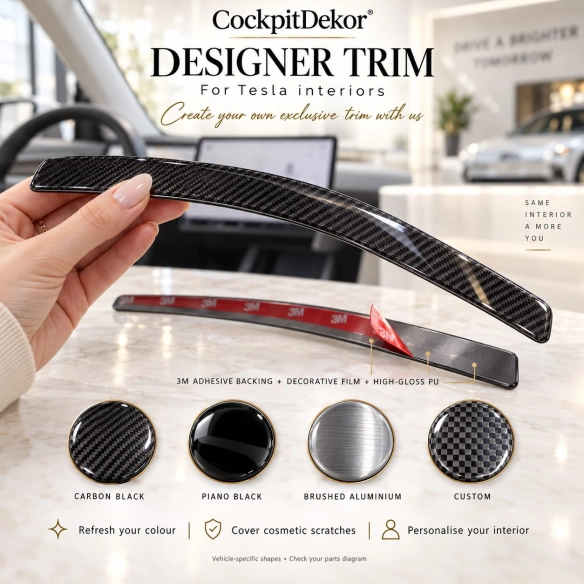
Every kit is made in your choice of finish, protected by a high-gloss 3D polyurethane layer.
- Wood (burl, walnut, maple): warm, classic, premium look.
- Carbon fibre: sporty and technical.
- Brushed aluminium: cool, modern, close to OEM.
- Piano black and solid colours: clean or personalised.
- The finish changes the look only – always check the version of your dashboard first.
A kit is made for one exact dashboard layout. Before ordering, check:
- make, model, production year and generation (before or after facelift);
- manual or automatic gearbox;
- manual or automatic climate control, radio / NAVI unit;
- the parts diagram and number of parts in the product photos;
- steering wheel position: select it in the option above the finishes.
No reviews
Tap to zoom
