Shopping Cart

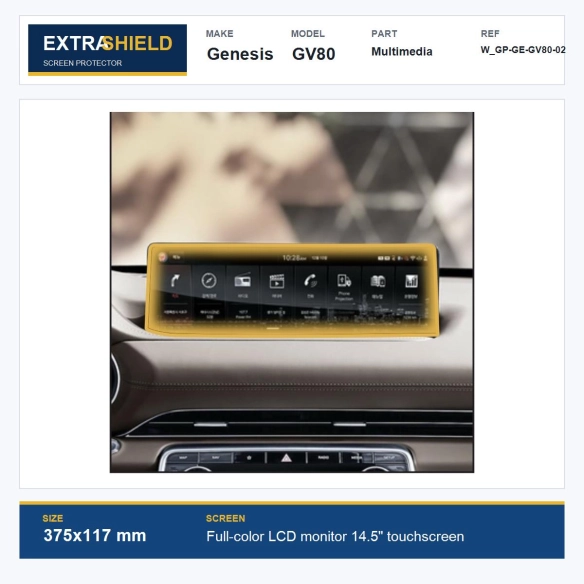


Genesis GV80 2020-2026 Multimedia 14.5" LCD Monitor Touchscreen ExtraShield Screen Protector
3 Reviews
W_GP-GE-GV80-02
€19.99
Tax included Manufacturing time 2-7 business days
ExtraShield protection for the specified display in your Genesis GV80. Check the screen position, specification, dimensions and shape before installation.
| Make | Genesis |
|---|---|
| Model | GV80 |
| Model years | 2020-2026 |
| Product type | ExtraShield screen protector |
| Parts included | 1 precision-cut protective film |
| Screen / position | Vehicle display; verify the installed position |
| Display specification | Full-colour LCD monitor 14.5" touchscreen |
| Protector dimensions | 375x117 mm |
| Film thickness | 130 microns |
| Product reference | Product ID 858 |
Genesis GV80 2020-2026 Multimedia 14.5" LCD Monitor Touchscreen ExtraShield Screen Protector
You wipe the display, catch the light and notice another tiny mark.
ExtraShield adds a protective film layer to the Full-colour LCD monitor 14.5" touchscreen application listed for your Genesis GV80. Check the shape and specification below to choose the version that matches your vehicle.
The useful part, at a glance
A separate film layer takes the everyday contact on its own surface. The shape matters: two vehicles from the same model year can have different displays or equipment.
| Purpose | Help protect the listed surface from everyday scratches and cleaning marks. |
|---|---|
| Application | Full-colour LCD monitor 14.5" touchscreen |
| Before ordering | Compare the outline, screen version and any supplied measurements. |

Product illustration. Check the listed application, dimensions and product diagram for your vehicle.
Check your vehicle and version
| Vehicle | Genesis GV80 |
|---|---|
| Manufacturing years | 2020 - 2026 |
| Screen / position | Multimedia |
| Screen specification | Full-colour LCD monitor 14.5" touchscreen |
| Protector size | 375x117 mm |
| Film thickness | 130 microns |
The layout check
Compare the actual surface outline and any cut-outs, not just the vehicle year or advertised screen diagonal. Use the measurements above where supplied. If your screen or equipment differs, check compatibility before fitting.
Film details
| Protector size | 375x117 mm |
|---|---|
| Film thickness | 130 microns |
| Reflections | The film is described as helping reduce glare; lighting conditions still affect visibility. |
| Fine surface marks | The listed self-healing surface is intended to make fine marks less visible; it does not repair damage to the original display. |
Tools and accessories
Installation tools are not included. Arrange any suitable cleaning cloth, dust-removal accessories or fitting tools separately.

Product illustration. Check the listed application, dimensions and product diagram for your vehicle.
Prepare, align and fit
1. Check the shape
Compare the protector with the listed surface before exposing the adhesive. Check the edges and openings against your own equipment.
2. Remove dust carefully
Follow the film’s fitting instructions and the vehicle manufacturer’s care guidance. Prepare a clean, dry surface and keep liquid away from openings and electronics.

Product illustration. Check the listed application, dimensions and product diagram for your vehicle.
3. Fit without rushing
Align the film carefully and use the recommended application method. Avoid improvised heating or abrasive cleaning; follow the supplied film instructions for care and any surface-recovery treatment.
Check once before ordering
Match the equipment version and film dimensions to your vehicle. For help with a different screen or an unclear measurement, ask about vehicle compatibility.

Product illustration. Check the listed application, dimensions and product diagram for your vehicle.
- Vehicle Brand
- Genesis
- Model
- GV80
- Part EN
- Multimedia
- Dimensions
- 375x117 mm
- Screen specification EN
- Full-color LCD monitor 14.5" touchscreen
100 Items
New
5483230008582
The kit is fitted over the existing surfaces – no dismantling of the dashboard.
- Clean and degrease every surface; silicone and interior sprays stop the adhesive from holding.
- Dry-fit each part against the parts diagram before removing the backing film.
- In a cold car, warm the parts and the dashboard slightly first.
- Press each part firmly from the centre to the edges.
- Avoid washing or stressing the edges for 24–72 hours.
Every kit is made in your choice of finish, protected by a high-gloss 3D polyurethane layer.
- Wood (burl, walnut, maple): warm, classic, premium look.
- Carbon fibre: sporty and technical.
- Brushed aluminium: cool, modern, close to OEM.
- Piano black and solid colours: clean or personalised.
- The finish changes the look only – always check the version of your dashboard first.
A kit is made for one exact dashboard layout. Before ordering, check:
- make, model, production year and generation (before or after facelift);
- manual or automatic gearbox;
- manual or automatic climate control, radio / NAVI unit;
- the parts diagram and number of parts in the product photos;
- steering wheel position: select it in the option above the finishes.
3 Reviews
Montage bij kou vraagt geduld
Bij koud weer moet je de montage rustig doen. Ik heb het deel meerdere keren droog gepast, de lijn op het dashboard gecontroleerd en pas daarna de achterste beschermfolie verwijderd en stevig aangedrukt. Getest op een Mercedes Sprinter interieur met Brushed Aluminium afwerking.
Sterke afwerking voor het dashboard
De levering was netjes verpakt en de delen kwamen onbeschadigd aan. De kwaliteit van de afwerking is goed. Na eerst droog passen was de montage eenvoudig en bleef alles goed zitten. Getest op een Ford Transit interieur met Brushed Aluminium afwerking.
Montage bij kou vraagt geduld
Bij koud weer moet je de montage rustig doen. Ik heb het deel meerdere keren droog gepast, de lijn op het dashboard gecontroleerd en pas daarna de achterste beschermfolie verwijderd en stevig aangedrukt. Getest op een Iveco Daily interieur met Brushed Aluminium afwerking.
Tap to zoom
